
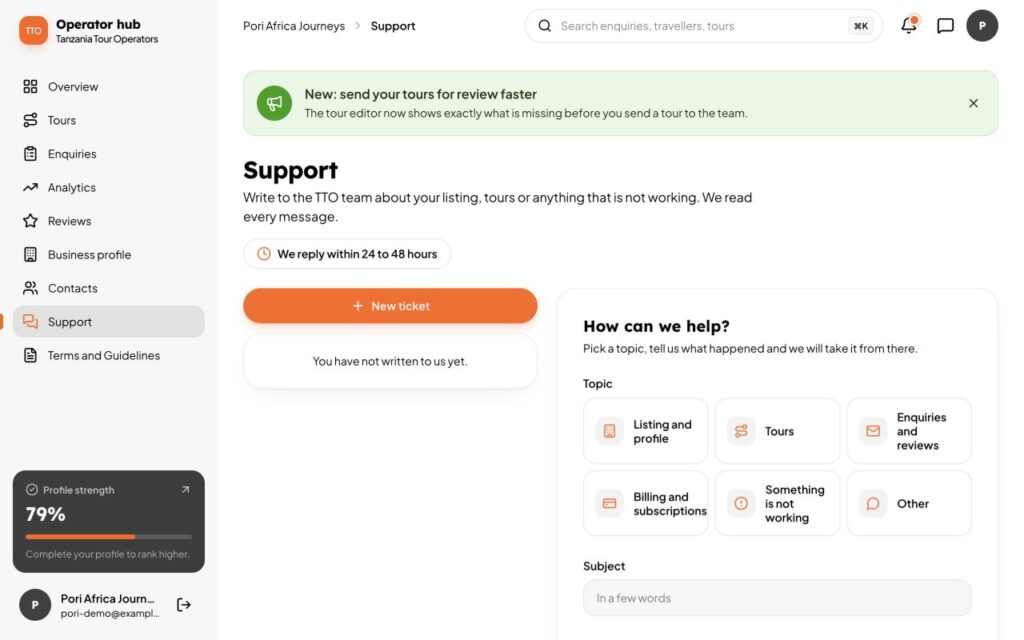
Partners can write to the TTO team from the dashboard. Open Support in the sidebar, or choose Contact support in the account menu.
Send a message
- Choose New ticket and pick a topic: Listing and profile, Tours, Enquiries and reviews, Billing and subscriptions, Something is not working, or Other.
- Write a short subject and your message. You can add a screenshot.
- Choose Send to support.
We reply within 24 to 48 hours. You get an email and a note in the bell when we do, and you can read the whole conversation under Support.
What the labels mean
- Waiting for our reply: it is with us.
- Answered: we replied. Your turn.
- Closed: finished. Reply any time to open it again.
Get a faster answer
- Say which tour or page you mean, and what you expected to happen.
- Add a screenshot of what you see.
- Look through this Help centre first. Many answers are here.
When it is solved, choose Mark as solved.